


Best Bicycle Computer Mounts for Handlebar Extension
Freecog cyclingIntroduction
Cycling has evolved beyond being just a mode of transportation or an occasional weekend activity. Today, it has become a lifestyle, a fitness regime, and a professional sport for many enthusiasts worldwide. With this evolution, technology has seamlessly integrated into cycling. Cyclists now rely on advanced gadgets such as GPS-enabled bike computers, performance trackers, and action cameras to enhance their riding experience.
However, using these devices effectively requires proper mounting solutions. A poorly mounted bike computer or accessory can be distracting, unsafe, and reduce performance efficiency. That’s where a bicycle computer mount holder with front extension handlebar bracket comes into play. Products like the one offered by FCC Racing provide cyclists with a stable, ergonomic, and practical solution to secure their gadgets.
In this blog, we will dive deep into why a handlebar extension mount is essential, its benefits, installation tips, compatibility, and how it improves your cycling performance. We’ll also provide a comprehensive guide on choosing the right mount for your bike.
Why Cyclists Need a Bicycle Computer Mount
Cyclists are constantly seeking efficiency, comfort, and performance. A bicycle computer or GPS tracker is now a common tool used to monitor speed, cadence, distance, elevation, and even heart rate. But without a secure mount, these devices can become a nuisance.
Here are key reasons why cyclists should invest in a bicycle computer mount holder with a front extension:
-
Improved Safety – Keeping your bike computer in front of the handlebars ensures that you don’t have to take your eyes off the road for long.
-
Better Visibility – A front extension positions the device in your natural line of sight, making data reading effortless.
-
Aerodynamics – These mounts often provide a streamlined setup, reducing drag compared to traditional mounting.
-
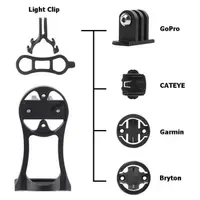
Accessory Integration – Many mounts include slots or adapters for GoPros, headlights, and other accessories.
-
Handlebar Space Management – By moving your computer slightly forward, you free up handlebar space for other essential gear.
Features of a High-Quality Handlebar Extension Mount
1. Material Strength and Durability
The best mounts are made from high-quality CNC aluminum alloy or reinforced polymers, ensuring they can withstand vibration, weather, and impacts.
2. Compatibility
Not all mounts work with every device. A good mount supports multiple GPS computer brands such as Garmin, Wahoo, Bryton, and others.
3. Aerodynamic Design
Cyclists, especially racers, value aerodynamics. A mount with a sleek, extended profile helps reduce drag.
4. Accessory Integration
Many mounts allow attachment of GoPros or headlights underneath, maximizing utility.
5. Adjustability
Some models allow angle adjustments, letting you fine-tune your viewing position.
6. Lightweight Design
Since every gram counts in cycling, mounts should be sturdy yet lightweight.
7. Secure Locking Mechanism
A strong twist-lock mechanism ensures your expensive bike computer doesn’t dislodge during rides.
Benefits of Using the Bicycle Computer Mount
The Bicycle Computer Mount offers cyclists a perfect balance of performance, reliability, and value. Here’s why it stands out:
-
Universal Compatibility: Works with popular brands like Garmin, Wahoo, Cateye, and Bryton.
-
Extended Design: Positions your computer in front of the handlebars for better aerodynamics.
-
Dual Mounting: Allows attaching cameras, headlights, or other gadgets underneath.
-
Durable Build: Made from lightweight yet robust aluminum alloy.
-
Secure Grip: Ensures your device stays firmly in place even on bumpy terrains.
How a Computer Mount Enhances Cycling Performance
While it might seem like a simple accessory, a handlebar extension mount actually contributes to performance in multiple ways:
-
Optimized Posture – Riders can maintain proper aerodynamic posture without needing to glance down.
-
Reduced Distraction – Clear visibility of stats minimizes road distractions.
-
Time Efficiency – Instant access to data helps cyclists adjust pace and performance in real time.
-
Professional Setup – Creates a clean, organized cockpit similar to what professional cyclists use.
Installation Guide for a Bicycle Computer Mount
Tools Required
-
Allen key set
-
Screwdriver (if needed)
Steps
-
Choose the Position – Select the optimal spot on your handlebar for visibility and comfort.
-
Attach Clamp – Place the mount clamp around the handlebar and tighten using the Allen key.
-
Secure Extension Arm – Adjust the extension arm so it projects forward without interfering with brake or gear cables.
-
Lock the Device – Twist your bike computer into the mount until it clicks securely.
-
Add Accessories – If applicable, attach a GoPro or headlight underneath.
Pro Tips
-
Ensure the mount doesn’t obstruct brake or shifter cables.
-
Do not overtighten screws; it may damage carbon handlebars.
-
Test the mount by riding over rough terrain before long rides.
Choosing the Right Bicycle Computer Mount
Not every cyclist has the same needs. Here’s a quick guide on how to choose the right mount:
-
For Road Cyclists – Opt for lightweight, aerodynamic mounts.
-
For Mountain Bikers – Choose stronger mounts with extra shock resistance.
-
For Commuters – Go for versatile mounts with accessory integration.
-
For Triathletes – Aerodynamic extension mounts are ideal.
Comparison: Traditional Mount vs. Front Extension Mount
FeatureTraditional Stem MountFront Extension Handlebar MountVisibilityLowHighAerodynamicsModerateExcellentAccessory SupportLimitedMultiple (GoPro, lights, etc.)SafetyLess optimalSafer, keeps eyes forwardHandlebar SpaceOccupies center spaceFrees up handlebar space
Frequently Asked Questions (FAQ)
1. Is a bicycle computer mount necessary?
Yes. It improves safety, aerodynamics, and riding efficiency.
2. Can I use it with any bike computer?
Most mounts, like FCC Racing’s, are compatible with Garmin, Wahoo, and Bryton. Always check before purchase.
3. Will it fit my handlebar size?
Most mounts come with adjustable clamps that fit standard handlebar diameters (31.8mm).
4. Is it safe to mount a GoPro under it?
Yes. High-quality mounts are designed to hold cameras and lights securely.
5. Does it add weight to my bike?
Not significantly. Most mounts are under 50g, adding negligible weight compared to the benefits.
Maintenance and Care
To ensure longevity of your bicycle computer mount:
-
Regularly check screw tightness.
-
Clean after muddy or rainy rides.
-
Inspect the locking mechanism for wear.
-
Replace if cracks or signs of fatigue appear.
The Bicycle Computer Mount offers the perfect combination of strength, compatibility, and aerodynamic efficiency. By placing your computer in an optimal position and offering additional mounting options for accessories, it ensures a clean, professional setup that rivals even pro cyclists’ gear.